August 31, 2026
Claude Code + AMOLED Arduino device
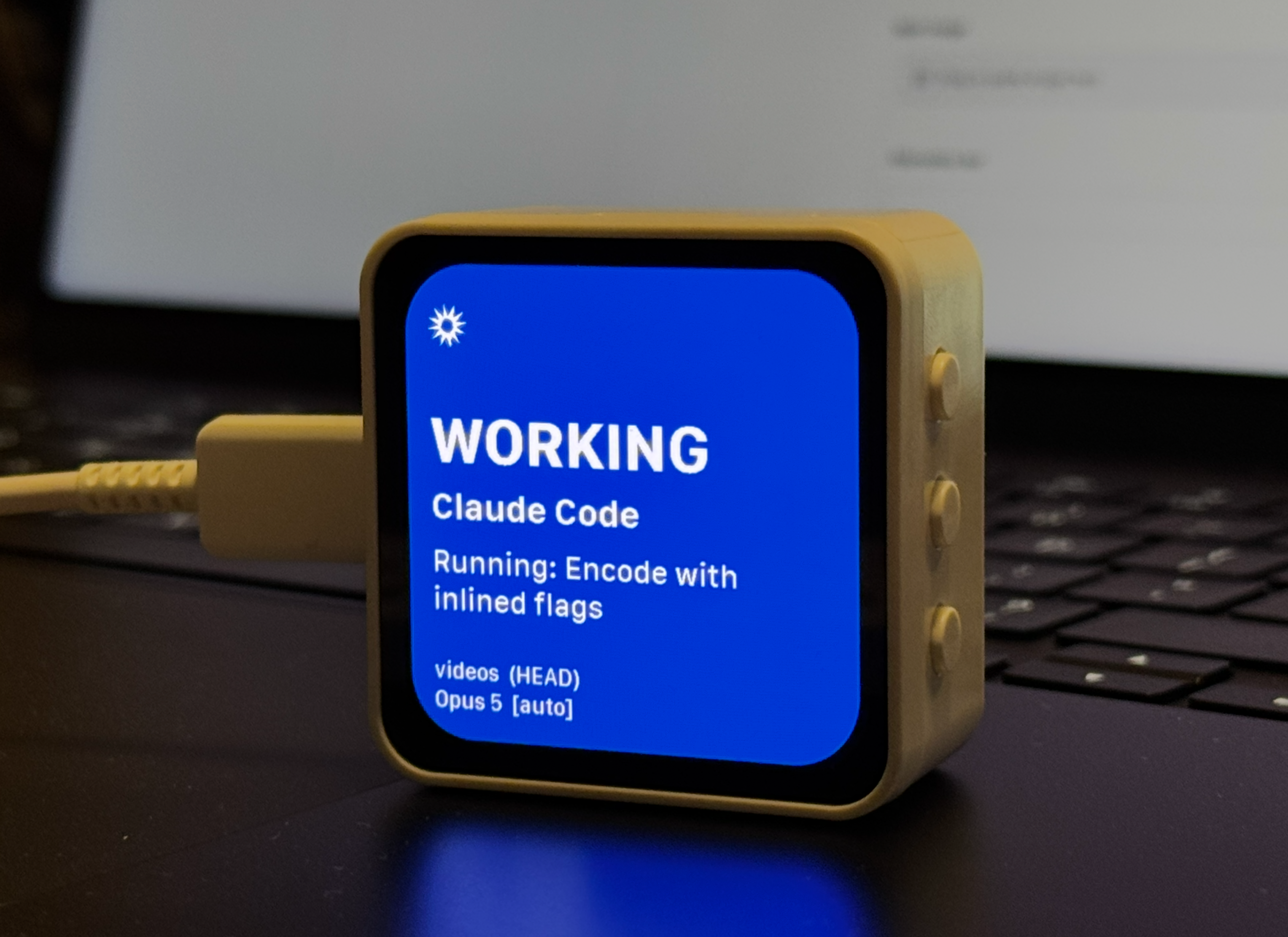
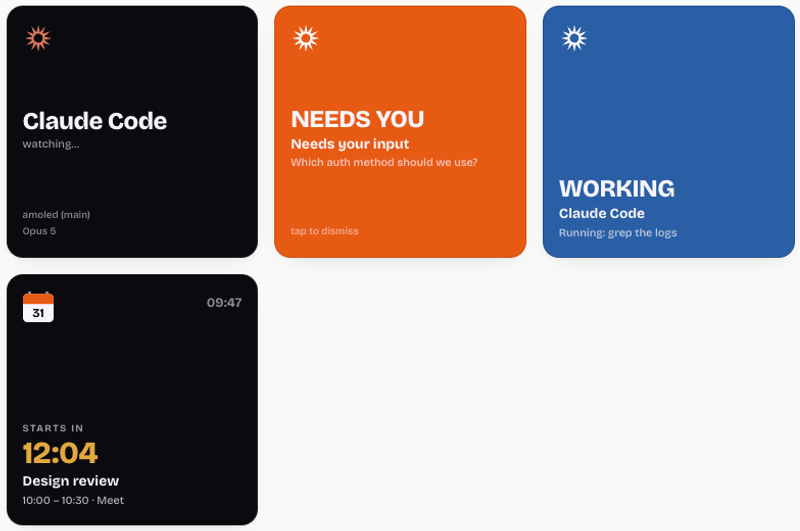
A desk panel that tells you what Claude is doing and when it needs your attention. A 2.16″ AMOLED panel that lights up orange when Claude Code is waiting on you, green when a turn finishes, and counts down to your next meeting the rest of the time. Built almost entirely by prompting Claude Code itself — the prompts are included below, along with the four bugs that cost me an afternoon.
Ever since I started using Claude Code I became obsessed with plugin it to other things and solving the annoyance of having to switch to Claude Code to see if it needs me.
I few weeks ago I purchased Vibe Island which is a dynamic island for AI agents, it looks great and works as intended. No more guessing since it notifies me when Code needs my attention in any of the sessions which solved the problem.
Then, I saw an unrelated video of a guy who had this small panel where as he explained had a visual reminder of his upcoming meetings. He accomplished it using ChatGPT Codex. So after watching the video I realized that I could use it for the purpose of displaying notifications from Claude. Went to Amazon and purchased the exact same device for $35.
For the configuration and coding, first I made the mistake of using Claude Desktop. Got it to work up to a certain point, then got the black screen of death so I decided to switch to Claude Code and that's when the whole process speed up. Claude Code communicated directly with the device, ran firmware, tests, volume (35% worked best for me), gyroscope, etc.
And as far as the Calendar goes, I went a step further and added a countdown exactly 1 hour before the meeting starts and then a beep 1 minute before. The trickiest part was the settings inside Google Cloud Console since I wanted to use the company's calendar but once you run the permissions then everything was pretty quick.
Here's the step by step. What you need
The board is a **Waveshare ESP32-S3-Touch-AMOLED-2.16** — a 480×480 round-cornered AMOLED with a capacitive touch layer, an ES8311 audio codec, a QMI8658 accelerometer and an AXP2101 power chip. It arrives assembled; you only need a USB-C cable.
Any ESP32 board with a display will work if you adapt the pin config and display driver, but the specific quirks I hit below are tied to this panel's CO5300 controller. On the Mac side you need Arduino IDE (for the ESP32 core and libraries) and Claude Code.
Claude Code fires hooks at points in a session. Drop notify-amoled.py into ~/.claude/hooks/ and register it in ~/.claude/settings.json for the events that matter:
- Notification: Orange > Claude wants you
- PermissionRequest: Orange > a tool needs approval
- PreToolUse: Blue, or orange for a question
- UserPromptSubmit: Blue > thinking
- Stop: Green > turn finished
The prompts — What I actually asked Claude Code
I wrote almost none of this by hand. These are the prompts, cleaned up slightly. The useful pattern is to state the hardware precisely, name the contract you want, and say what must *not* happen.
**Prompt 1 · the firmware and hook**

> I have a Waveshare ESP32-S3-Touch-AMOLED-2.16 (480×480, CO5300 QSPI display, ES8311 codec, QMI8658 IMU) on /dev/cu.usbmodem1101.
>
> Write an Arduino sketch that joins WiFi, advertises itself over mDNS as claude-notify.local, and serves POST /notify taking JSON {type, title, message, project}. type is "attention" (orange screen, chime, stays until tapped), "done" (green, clears itself) or "status" (blue, silent).
>
> Then write a Python hook for ~/.claude/hooks/ that POSTs to it from the Notification, Stop, PreToolUse, PermissionRequest and UserPromptSubmit hooks, plus an idempotent installer that merges the entries into ~/.claude/settings.json. PreToolUse fires on every tool call, so the hook must never block for more than a second even if the panel is unplugged.**Prompt 2 · readable typography**
> The panel draws text with the built-in 5×7 GFX font scaled up with setTextSize, so everything looks like fat dots. Convert a real TTF into Adafruit GFXfont format at the sizes I need and use that instead.
>
> Write the converter as a reusable tool in the repo so I can regenerate at other sizes and weights, and verify the bit packing on my Mac before flashing rather than by looking at the device.**Prompt 3 · the calendar app**
> Add a second app to the panel: a calendar screen showing my next meeting with a countdown, switched by tapping the idle screen. An incoming Claude alert should interrupt whichever app is showing and return to it when dismissed.
>
> The Mac does the Google Calendar work and POSTs to /calendar; the panel counts down locally against NTP so it doesn't need a clock or credentials. Write the pusher stdlib-only — no pip, no virtualenv — because it'll run from launchd every minute. Skip all-day blocks and declined events. Chime when a meeting starts, but only within a couple of minutes of the real start so a reboot can't set it off for something that began hours ago.**Prompt 4 · the one that actually mattered**
> The panel fills with the right colour but shows no text at all. Don't guess — make the device report what the glyph machinery actually computes over HTTP, and work backwards from that.A note on the typeface
I used SF Compact for the panel text, since it's the Apple Watch face and sits perfectly on a small round-cornered screen. It's already on any Mac at /System/Library/Fonts/SFCompact.ttf.
It's Apple-licensed for Apple platforms, so it's fine on a personal device but shouldn't ship in anything you redistribute. The converter takes a font path as an argument — point it at Inter, Roboto or DejaVu Sans and regenerate, and nothing else changes.
Let me know if you run into any issues. I'll be glad to help.
*People ask me if this approach would work for Codex or Grok and the answer is yes. It just gets involved in the hooks which is something that all of them have.